# Welcome to Emerald City

Community-run education, building, and auditing on the Flow blockchain.

[Discord](https://discord.gg/emerald-city-906264258189332541) | [Twitter](https://twitter.com/emerald_dao)

<figure><img src="/files/HDq1S33q6CwhpxhVNC4y" alt=""><figcaption></figcaption></figure>

## About Emerald City

Emerald City is made up of four (awesome) things, all on the [Flow blockchain](https://flow.com/):

### 1. Products

Various tools to help you launch and grow a successful DAO or community.

{% content-ref url="/pages/WdOtAlTWmyXoeUkvRe5S" %}
[Toucans](/products/toucans)
{% endcontent-ref %}

{% content-ref url="/pages/KoTDoC0Hup1Aenf6dMuF" %}
[FLOAT](/products/float)
{% endcontent-ref %}

{% content-ref url="/pages/Kvm3YwRsh6bXTSXVo12o" %}
[Emerald bot](/products/emerald-bot)
{% endcontent-ref %}

{% content-ref url="/pages/5Q2J8cOz8FKjIg0e13xK" %}
[Touchstone](/products/touchstone)
{% endcontent-ref %}

### 2. Education

Learn Flow/Cadence development. We provide the best education on Flow.

{% content-ref url="/pages/ByTIl4DrLE9RBC12zAq7" %}
[Emerald Academy](/education/emerald-academy)
{% endcontent-ref %}

{% content-ref url="/pages/Mt0rZx21HErvm7mSl8Iq" %}
[Broken mention](broken://pages/Mt0rZx21HErvm7mSl8Iq)
{% endcontent-ref %}

### 3. Auditing

We offer the most experienced and safe auditing service on Flow.

{% content-ref url="/pages/YjyHzQJTNAjxaZGKYEon" %}
[Shield](/auditing/shield)
{% endcontent-ref %}

### 4. Tooling

We made a bunch of tools to help community members & developers alike.

{% content-ref url="/pages/EpqKNLSq98k9JpRzwoQn" %}
[Helpful Tools](/developer-tooling/helpful-tools)
{% endcontent-ref %}


# Toucans

Create your own fungible token. Launch a DAO. Manage a multi-sig treasury.

{% embed url="<https://toucans.ecdao.org>" %}

## Video Walkthrough

{% embed url="<https://www.youtube.com/watch?v=YNAzvv14cF0>" %}

## About Toucans

Toucans is a no-code solution that allows you to create your own Fungible Token and/or DAO. You can:

* Fundraise with your new token
* Accept donations into the DAO
* Vote with your token

Additionally, the DAO automatically contains a multi-sig treasury to mint new tokens, withdraw tokens from the treasury, add signers, and more.

{% hint style="info" %}
Want to vote with your Toucans directly in Discord? Check out [this](/products/emerald-bot/voting/toucans-voting) page.
{% endhint %}

{% hint style="info" %}
Want to verify user Toucan holdings in Discord? Check out [this](/products/emerald-bot/verification/verify-toucans) page.
{% endhint %}

### Generating a DAO

When generating a DAO, you will be asked to fill in some basic information about your DAO and token.

#### Tokenomics

During the tokenomics section, there are a few inputs:

* Payment currency: The currency you wish to fundraise in. **You cannot change this later**. However, basic donations can still be in any currency.
* Max supply: Available if you wish to set a max supply for your token. This is more of a communication tool for your community members to see you don't wish to ever pass a certain supply. *Recommended: Off*.
* Initial supply: The number you place here will be minted into the DAO treasury upon creation. **Please note that when you fundraise and it issues your DAO's token to the user in exchange for payment, it will not come from the initial supply / the treasury's supply. The tokens will be minted on-demand during a funding round.** You can always mint tokens into the treasury later. *Recommended: 0***.**
* Mint tokens: Turn on if you wish to be able to mint your DAO's token to users or your treasury at any point. *Recommended: On*.

#### Edit Delay

Numbers of days in which you can edit the configuration of your funding round before it starts. This is to prevent any last-minute changes that could affect the outcome of the round. The higher the delay, the greater trust your community will have in you.

### Your Fungible Token Contract

When you generate a DAO, a fungible token contract is created and deployed to your account.

You completely own your contract. Toucans has 0 control over it. Because of this, there are various [risks ](/products/toucans/risks)that users must be aware of.

The benefit of this is that you can do whatever you want with it outside the platform. You could use it to stake, create liquidity pools, farms, yields, and whatever else you want.

### Fundraising

<figure><img src="/files/k79rqkguBo1Moge0yktQ" alt=""><figcaption><p>You can start a funding round on the Admin dashboard.</p></figcaption></figure>

The basic idea of fundraising is you want your users to fund your DAO with a supported form of payment (ex. $FLOW or $USDC), and in return, they get your native token (ex. $EMLD).

To establish this correlation, you set an *issuance rate.* For example, if your issuance rate is 10 and your DAO accepts $FLOW, then for every 1 $FLOW funded, 10 $EMLD will be minted. It is important to note the user will only receive 9.5 $EMLD because there is a 5% platform tax.

You can configure a bunch of settings for your funding round:

* Timeframe - the time in which your funding round occurs. A start time is required, but an end time is optional. A funding round can have an infinite duration.
  * If a funding round has an infinite duration, it will stop when another funding round starts. You can also pause a funding round at any time.
* Funding target - the amount of $ you want to raise.
* Overflow - if turned on, your users can purchase any amount of your DAO's token given the issuance rate. Any funds raised beyond the funding target will go into Overflow.
  * Funds in Overflow can be bought back by users using your DAO's token at a rate based on what percentage of the total supply of your DAO's token they own. For example, if a user sends in 10% of the $EMLD supply back to the DAO treasury, they can get 10% of the Overflow in return.
  * Funds in Overflow can also be transferred to your next funding round and used towards its goal when it starts.
* Required NFT - if configured, users must own a certain NFT to participate in the round
* Payouts - a list of addresses and percentages. When a user funds, the payout address will automatically get the associated % of the funds donated.

**When users fund your DAO during a funding round, your DAO's token (ex. $EMLD) is minted on demand and then transferred to the user. The tokens do not come from the treasury**. This may be different from other platforms you have used. We do it this way so you are only ever minting the exact amount of tokens you need.

<figure><img src="/files/1qH2gHh0udU4ILGaFiBk" alt=""><figcaption><p>User purchasing during a funding round.</p></figcaption></figure>

### The Treasury

When you create a DAO on Toucans, it automatically sets up a treasury for you. This treasury is "multi-signed", which means you can add/remove signers (aka "Admins") that are able to vote on proposals occurring within your treasury.

Here is a list of proposals:

* Mint: Mint your DAO's token (ex. $EMLD) to a recipient
* Burn: Burn your DAO's token (ex. $EMLD) from the treasury
* Withdraw: Withdraw tokens from the treasury
* Add Signer: Add a signer to the treasury
* Remove Signer: Remove a signer from the treasury
* Update Threshold: Update the threshold for which a proposal is accepted

Once a proposal has been created, all the signers will then vote on it. Once *threshold* number of signers have said 'Yes', the proposal will be executed. If there are enough 'No' votes, the proposal will be deleted.

*Note that the threshold is set when the proposal is created. If you create a mint proposal when the threshold is 3, and later change the threshold to 4 before the mint proposal has been decided on, the threshold for that proposal will still be 3.*

<figure><img src="/files/aF5kaFmwjlMVn7wtXAkU" alt=""><figcaption><p>Basic idea of how multi-signing works.</p></figcaption></figure>


# Risks

When a user creates a DAO on the Toucans platform, the fungible token smart contract that is created is stored in the creator's account storage.

Although we believe this is a huge advantage because it allows users to have full control over their contract and gives DAOs independence from our platform, it also means that they can directly manipulate the token contract.

*The following are the main risks related to this.*

### Tokens can be minted even if this feature is turned off

The project owner can mint tokens even if the minting feature is turned off by updating their contract. This can potentially cause inflation and impact the value of tokens.

The minting being turned off/on should solely be used as a communication tool from the owner to their community that they do not intend to ever mint.

### Total supply updates

Project administrators can update the total supply at their discretion, which may affect funding overflow calculations and impact the value of tokens.

This can be done simply by updating the total supply number, or by minting tokens as described above.

### Max supply can be edited

If project administrators configure a max supply, they can change the it to be a different number, which may affect how much they can mint and potentially impact the value of tokens.

If there is a max supply present, it should solely be used as a communication tool from the owner to their community that they do not intend to ever mint more than a certain amount.


# How to Set up your Wallet

In order to receive tokens from a project, you must have a vault set up in your wallet.

### 1. Choose your Wallet

The most popular options are Blocto, [Flow Ref](https://chromewebstore.google.com/detail/flow-reference-wallet/hpclkefagolihohboafpheddmmgdffjm), or [Shadow](https://chromewebstore.google.com/detail/shadow-aptos-flow-wallet/lmmpaefggfcmnoddemmgdppddppnmhek). You cannot use Dapper Wallet for tokens.

### 2. Log in to Toucans

Next, go to the project's homepage (ex. [https://toucans.ecdao.org/p/](https://toucans.ecdao.org/p/Freely)[ADUToken](https://toucans.ecdao.org/p/ADUToken)) and click the green "Connect" button in the top right corner.&#x20;

Then click your chosen wallet.

<figure><img src="/files/Vbo8fXfXX1FvaCu7pOHM" alt=""><figcaption></figcaption></figure>

### 3. Set Up Vault

On the project's page (ex. <https://toucans.ecdao.org/p/ADUToken>), you should now see a section that looks like this at the top:

<figure><img src="/files/9SdxTqvnGQ3j0Fq5qImw" alt=""><figcaption></figcaption></figure>

Click "Set Up Vault" and approve the transaction.

### 4. Done!

###


# Add your Token to DEX

This page will walk you through how to get your Toucan token listed on Increment.Fi

You have created your token on Toucans and now want to get it listed on [Increment Fi](https://app.increment.fi). There are 2 ways to make that happen:

## Option #1: Ask Jacob in Emerald City Discord

Head to the [Emerald City Discord](https://discord.com/invite/emerald-city-906264258189332541) and ping Jacob to add the token for you. This is a quick & easy option to get it listed.

## Option #2: Do it Yourself

{% hint style="info" %}
If you do this step, you will still need to ping Jacob in the Emerald City Discord to accept your PR at the end. But it will take work off of his plate, so he would greatly appreciate it! ;)
{% endhint %}

1. Fork the following repo: <https://github.com/FlowFans/flow-token-list>
2. Go to the `token-registry` folder and add a new folder
   1. To name the folder, you will have to know the contract address and contract name of your token. To do that, go to [Contract Browser](https://contractbrowser.com/) and in the top search bar, look up your project ID from Toucans. If you don't know what a project ID is, it's just the last part of the URL for your DAO's page (ex. for <https://toucans.ecdao.org/p/ADUToken>, it is `ADUToken`)
   2. Once you find the contract, you can find the contract name, which is also the same as your project ID (ex. `ADUToken`) and contract address (ex. `0xe452a2f5665728f5`)

      <figure><img src="/files/2OaaKZa0gWInr8TCMLeY" alt=""><figcaption></figcaption></figure>
   3. Then name the folder `A.{contract address without the 0x}.{contract name}`. For example, `A.e452a2f5665728f5.ADUToken`
3. Inside that folder, add your token logo as a `logo.png` file. Make sure the logo is relatively small in size (\~10 KB)
4. Inside the same folder, add a `token.json` file that looks like [`this`](https://github.com/FlowFans/flow-token-list/blob/main/token-registry/A.e452a2f5665728f5.ADUToken/token.json).
   1. address: the contract address that you got above
   2. contractName: the contract name that you got above (same as your project ID)
   3. path: follow the same format you see in the example, except replace `ADUToken` with your project's ID in all 3 paths
   4. symbol: the token symbol you chose on Toucans when you created your token. Just make sure you do NOT include the $ symbol.
   5. name: the DAO name you chose on Toucans when you created your token.
   6. decimals: 8
   7. logoURI: use `"https://cdn.jsdelivr.net/gh/FlowFans/flow-token-list@main/token-registry/A.e452a2f5665728f5.ADUToken/logo.png"`, but replace `A.e452a2f5665728f5.ADUToken` with your folder name from above
   8. tags: "utility-token"
   9. extensions: {}
5. Copy the contents of your `token.json` file and then go to the `src/tokens/flow-mainnet.tokenlist.json` file
   1. In that file, add your object at the bottom of the list
6. Make a PR to the the [original repo](https://github.com/FlowFans/flow-token-list) using your fork
7. Ping Jacob in the [Emerald City Discord](https://discord.com/invite/emerald-city-906264258189332541) to accept the PR


# FLOAT

Give citizens a participation NFT for attending your office hours, town halls, twitter spaces, IRL events, and more.

{% embed url="<https://floats.city/>" %}

### About FLOAT

FLOAT is a proof of attendance/participation platform.

It is most popularly used by managers of a city to give their citizens NFTs for attending events that happen within their city.&#x20;

Examples of events:

* Town Halls (weekly/monthly recaps that happen in your Discord)
* Twitter Spaces
* IRL meetups
* Office Hours

### Grow Your City

A list of use cases to help you utilize FLOAT.

#### Reward Citizens

Give citizens a unique NFT reward for coming to your events.

#### Keep Track of Active Citizens

City managers often use FLOAT to keep track of who is attending various events in their city. Because FLOAT is entirely on-chain, and thus entirely public, anyone can see who owns their FLOATs and whether or not you attended certain events.

#### Gated Access

Using Emerald bot, you can give citizens who own a specific FLOAT certain roles in Discord. Then you can create channels (chat rooms) that are private to only citizens with that role. This means you can use FLOAT to easily set up gated chat rooms for active community members.


# Emerald bot

Grant roles for NFT / token holdings, discover information about citizens, and many Flow utilities.

### About Emerald bot

Emerald bot is a verified Discord bot, and the most popular on Flow.

It provides a series of **Commands** that you can paste directly into Discord to execute.

### Add to Your Discord

Click [here](https://discord.com/oauth2/authorize?client_id=907407354427998279\&permissions=294473821264\&scope=bot%20applications.commands) to add the bot to your Discord.

### Supported Wallets

Emerald bot supports Blocto, Dapper Wallet, Flow Ref, and Shadow.

### Grow Your Discord

There is a huge list of utilities Emerald bot provides.

{% content-ref url="/pages/Qln7FtOHI9WhsgZ8EEX4" %}
[Verification](/products/emerald-bot/verification)
{% endcontent-ref %}

{% content-ref url="/pages/nLCQCvPq2CXUYikMzb6E" %}
[Voting](/products/emerald-bot/voting)
{% endcontent-ref %}

{% content-ref url="/pages/x6i9j938Sao6bMmXgv7i" %}
[Discovery](/products/emerald-bot/discovery)
{% endcontent-ref %}

{% content-ref url="/pages/0dzeHFYbRPJtgPw6N1u7" %}
[Dapper Sports](/products/emerald-bot/dapper-sports)
{% endcontent-ref %}

{% content-ref url="/pages/3R9YDPAspnkydP0373SH" %}
[Tipping](/products/emerald-bot/tipping)
{% endcontent-ref %}


# Verification

Verify users wallet holdings & grant specific roles.

### Summary

You can set up a "Verifier" directly in Discord that citizens can interact with to earn special roles in your Discord based on their NFT / Token wallet holdings. By granting special roles, you can then create gated chat rooms only for citizens with certain roles.

<figure><img src="/files/F49bksXWaxLI1kWTqyGn" alt=""><figcaption><p>Example verifier used in the <a href="https://discord.gg/flunks">Flunks Discord</a>.</p></figcaption></figure>

### Commands to Use

This is a list of commands for verifying assets directly in Discord.

{% content-ref url="/pages/f5UKqKhlKuinYpTTMml5" %}
[Verify User Assets](/products/emerald-bot/verification/verify-user-assets)
{% endcontent-ref %}

{% content-ref url="/pages/BkKGwnm3a0IFoZ3dvfn7" %}
[Verify Touchstone NFTs](/products/emerald-bot/verification/verify-touchstone-nfts)
{% endcontent-ref %}

{% content-ref url="/pages/dttL2jTqVUvDYfbH1aDx" %}
[Verify Toucans](/products/emerald-bot/verification/verify-toucans)
{% endcontent-ref %}


# Verify User Assets

Verify that a user owns any combination of on-chain assets.

{% hint style="info" %}
Before reading below, make sure you have invited the Emerald bot to your Discord server using [this link](https://discord.com/oauth2/authorize?client_id=907407354427998279\&permissions=294473821264\&scope=bot%20applications.commands).
{% endhint %}

## Summary

This page will show you how to set up a verifier that will, when a user clicks it, automatically scan their wallets and give them certain roles for passing certain verifications that you want to configure.

This will work with NFTs, tokens, or any type of on-chain asset.

{% hint style="info" %}
**Multi Wallet Check**: Let's say one requirement is to hold 3 Doodles. If a user owns 1 Doodle in their Dapper Wallet, and 2 in their Blocto wallet, **they will still pass**. Yeah, I know, we're cool like that.
{% endhint %}

There are 3 different ways to get a verification set up depending on what you need:

1. **Custom Verifier** (*requires help*) - Have the Emerald City team set up a custom verification for you that can distribute multiple Discord roles depending on any combination of assets/requirements.
2. **NFT Verifier** (*can set up on your own*) - Set up a quick verifier that checks if the user owns a certain NFT (ex. TopShot Moments).
3. **Token Verifier** (*can set up on your own*) - Set up a quick verifier that checks if the user owns a certain amount of a fungible token (ex. $FLOW).

### 1. Custom Verifier

This option allows you to create 1 verifier in Discord that can distribute multiple Discord roles depending on any type of requirement.

For example, the Flunks team had us set up a verifier that gives out many different Discord roles, each with their own requirement:

* 1 or more Flunks -> <mark style="color:blue;">Flunks Holder</mark>
* 12 or more Flunks -> <mark style="color:purple;">Flunk Whale</mark>
* 1 or more Backpack NFTs -> <mark style="color:red;">Backpack Holder</mark>

<figure><img src="/files/N7ZO4aRbwNW1xfbUAc5c" alt=""><figcaption></figcaption></figure>

With a custom verifier, we can also personalize how it is displayed:

* The title (ex. *"Verify your Flunks assets"*)
* The description (ex. *"Click the Verify button below to verify your assets with your EmeraldID."*)
* Fields (ex. *1 or more Flunks, etc*)

#### Set Up

To set it up, [reach out to us in Discord](https://discord.gg/emeraldcity) with any custom setup you'd like, as well as the requirements for each role and the associated "Role ID".&#x20;

Here is an example:

{% hint style="info" %}
To get the "Role ID" for a role, go to your Discord server and click on "Server Settings" > "Roles" > the three dots next to a role > "Copy Role ID"
{% endhint %}

| Role ID             | Requirement                                                 |
| ------------------- | ----------------------------------------------------------- |
| 1003849437103272018 | User owns NBA TopShot Set "Cool Cats" **AND** 2 Flunks NFTs |
| 923493249235235235  | User owns 1 Flunk NFT **OR** 1 Doodle NFT                   |
| 2346574545634234233 | User owns 1 FLOAT NFT                                       |

### 2. NFT Verifier

This option allows you to set up a simple verifier that checks if a user owns a certain NFT and gives them a role if so.

For example, check if a user owns a Doodle NFT and give them the "<mark style="color:green;">Emerald ID</mark>" role:

<figure><img src="/files/B6RSsMEtu0R1L7GQYxrO" alt=""><figcaption></figcaption></figure>

#### Set Up

In your Discord server, go to a channel you'd like users to go to in order to verify their assets. Then, type `/verify nft` into the channel and you should see a command appear, like this:

<figure><img src="/files/5erm4sjdtyIraNedLIGE" alt=""><figcaption></figcaption></figure>

Options:

* contractname - The name of the contract
* contractaddress - The address of the contract. If you have trouble finding it, head to the [Contract Browser](https://contractbrowser.com/).
* publicpath - The public path for which the assets lie (ex. if the whole path is `/public/doodles`, just type `doodles`). If you need help finding this, just ask us in Discord.
* role - the role users should earn if they have the NFT

### 3. Token Verifier

This option allows you to set up a simple verifier that checks if a user owns a certain amount of a fungible token and gives them a role if so.

For example, check if a user owns 40 $FLOW and give them the "<mark style="color:green;">Emerald ID</mark>" role:

<figure><img src="/files/aWJQD3R1NeyIYy0ZbnIW" alt=""><figcaption></figcaption></figure>

#### Set Up

In your Discord server, go to a channel you'd like users to go to in order to verify their assets. Then, type `/verify token` into the channel and you should see a command appear, like this:

<figure><img src="/files/6u2xZJnylZlqgjq7StGW" alt=""><figcaption></figcaption></figure>

Options:

* contractname - The name of the contract
* contractaddress - The address of the contract. If you have trouble finding it, head to the [Contract Browser](https://contractbrowser.com/).
* publicpath - The public path for which the assets lie (ex. if the whole path is `/public/flowTokenBalance`, just type `flowTokenBalance`). If you need help finding this, just ask us in Discord.
* role - the role users should earn if they have the amount of tokens


# Verify Touchstone NFTs

Verify that a user has a certain amount of your Touchstone NFTs in their wallet.

{% hint style="info" %}
Before reading below, make sure you have invited the Emerald bot to your Discord server using [this link](https://discord.com/oauth2/authorize?client_id=907407354427998279\&permissions=294473821264\&scope=bot%20applications.commands).
{% endhint %}

### Summary

This command will let you set up a verifier that will, when a user clicks it, automatically scan their wallets and give them a certain role for holding a specific number of your Touchstone NFTs.

### Command

```
/verify touchstone
```

#### Inputs

1. `contractaddress` - the address of where the contract is deployed (if you are the owner of the Touchstone collection, this is just your wallet address)
2. `contractname` - the name of the contract (you can find this on the Admin Dashboard)
3. `amount` - the amount of NFTs the user must own
4. `role` - the role the citizen should get if they pass

### Helpful Pictures

<figure><img src="/files/zYFmXvhW8mcjnDsOGH9V" alt=""><figcaption><p>Example Usage</p></figcaption></figure>


# Verify Toucans

Verify that a user has a certain amount of your Toucans tokens in their wallet.

{% hint style="info" %}
Before reading below, make sure you have invited the Emerald bot to your Discord server using [this link](https://discord.com/oauth2/authorize?client_id=907407354427998279\&permissions=294473821264\&scope=bot%20applications.commands).
{% endhint %}

### Summary

This command will let you set up a verifier that will, when a user clicks it, automatically scan their wallets and give them a certain role for holding a specific number of your Toucans tokens.

### Command

```
/verify toucans
```

#### Inputs

1. `projectid` - Your DAO's project id. It is the last part of your project's URL. For example, the project id of <https://toucans.ecdao.org/p/BallerzFC> is `BallerzFC`
2. `amount` - the amount of tokens the user must own
3. `role` - the role the citizen should get if they pass

### Helpful Pictures

<figure><img src="/files/itcM6RHDGGW2CBA3AMZx" alt=""><figcaption></figcaption></figure>


# Voting

Set up a vote directly in your city.

### Summary

You can set up weighted NFT voting, or token voting, directly in Discord.

Users can only vote once, and their vote is weighted based on how much of a certain NFT they own, or how many tokens they own.

<figure><img src="/files/Lk6duWEOoHdHT2iTR48K" alt=""><figcaption></figcaption></figure>

### Viewing Data from a Vote

For NFT & Token votes, an Admin can access extra functionalities:

* View all the users who voted and what they voted for.
* Start a raffle that will select a user who voted for the winning option (or if the vote is not yet over, it will select whichever one is currently winning).&#x20;

<figure><img src="/files/7MOxvdCfsXND5dpctd51" alt=""><figcaption></figcaption></figure>

### Commands to Use

This is a list of commands for voting directly in Discord.

{% content-ref url="/pages/47q0OwMTCFjVP1HSpNup" %}
[NFT Voting](/products/emerald-bot/voting/nft-voting)
{% endcontent-ref %}

{% content-ref url="/pages/lurA2a1KSrWSDgBwpNvo" %}
[Token Voting](/products/emerald-bot/voting/token-voting)
{% endcontent-ref %}

{% content-ref url="/pages/vqoIdUYfYMI48W7ZJ2BS" %}
[Toucans Voting](/products/emerald-bot/voting/toucans-voting)
{% endcontent-ref %}


# NFT Voting

Set up an NFT-weighted vote directly in Discord.

{% hint style="info" %}
Before reading below, make sure you have invited the Emerald bot to your Discord server using [this link](https://discord.com/oauth2/authorize?client_id=907407354427998279\&permissions=294473821264\&scope=bot%20applications.commands).
{% endhint %}

There are 2 commands you can use to start an NFT Vote depending on if your NFT is in the [NFT Catalog](https://www.flow-nft-catalog.com/) or not.

### Command 1 - NFT Catalog

This is what you should use if your NFT is in the [NFT Catalog](https://www.flow-nft-catalog.com/).

```
/vote nft catalog
```

#### Inputs

1. `identifier` - The collection identifier (ex. `Flunks`). The bot will auto suggest options if you start typing them in.
2. `option_1` - The first option users can vote for.
3. `option_2` - The second option users can vote for.
4. `role` - the Discord role a citizen must have in order to vote (put `@everyone` if you want everyone to vote)
5. `title` - the title of the vote
6. `description` - the description of the vote
7. `weighted` - put `True` if you want a citizen's vote to count based on the # of NFTs they have. Put `False` if you want everyone's vote to be worth 1 no matter how many NFTs they have (they must have >= 1)
8. `hide_results` - If true, users must vote in order to see vote results. If false, they can view results at any time.
9. (OPTIONAL) `end_date` - Set a date (in [UNIX timestamp](https://www.unixtimestamp.com/)) for when the vote should automatically end.
10. (OPTIONAL) `options 3 - 6` - Set additional options for users to vote for.

### Command 2 - Any NFT

This is what you should use if your NFT is **not** in the [NFT Catalog](https://www.flow-nft-catalog.com/).

```
/vote nft generic
```

#### Inputs

1. `contractname` - The name of the contract
2. `contractaddress` - The address of where the contract is deployed
3. `publicpath` - The public path of the NFT Collection (ex. If the public path is `/public/FLOATCollection`, you would input `FLOATCollection`).
4. `option_1` - The first option users can vote for.
5. `option_2` - The second option users can vote for.
6. `role` - the Discord role a citizen must have in order to vote (put `@everyone` if you want everyone to vote)
7. `title` - the title of the vote
8. `description` - the description of the vote
9. `weighted` - put `True` if you want a citizen's vote to count based on the # of NFTs they have. Put `False` if you want everyone's vote to be worth 1 no matter how many NFTs they have (they must have >= 1)
10. `hide_results` - If true, users must vote in order to see vote results. If false, they can view results at any time.
11. (OPTIONAL) `end_date` - Set a date (in [UNIX timestamp](https://www.unixtimestamp.com/)) for when the vote should automatically end.
12. (OPTIONAL) `options 3 - 6` - Set additional options for users to vote for.


# Token Voting

Set up an Token-weighted vote directly in Discord.

{% hint style="info" %}
Before reading below, make sure you have invited the Emerald bot to your Discord server using [this link](https://discord.com/oauth2/authorize?client_id=907407354427998279\&permissions=294473821264\&scope=bot%20applications.commands).
{% endhint %}

### Command

```
/vote token
```

#### Inputs

1. `contractname` - The name of the contract
2. `contractaddress` - The address of where the contract is deployed
3. `publicpath` - The public path of the NFT Collection (ex. If the public path is `/public/FLOATCollection`, you would input `FLOATCollection`).
4. `option_1` - The first option users can vote for.
5. `option_2` - The second option users can vote for.
6. `role` - the Discord role a citizen must have in order to vote (put `@everyone` if you want everyone to vote)
7. `title` - the title of the vote
8. `description` - the description of the vote
9. `hide_results` - If true, users must vote in order to see vote results. If false, they can view results at any time.
10. (OPTIONAL) `end_date` - Set a date (in [UNIX timestamp](https://www.unixtimestamp.com/)) for when the vote should automatically end.
11. (OPTIONAL) `options 3 - 6` - Set additional options for users to vote for.


# Toucans Voting

Set up an Toucan-weighted vote directly in Discord.

{% hint style="info" %}
Before reading below, make sure you have invited the Emerald bot to your Discord server using [this link](https://discord.com/oauth2/authorize?client_id=907407354427998279\&permissions=294473821264\&scope=bot%20applications.commands).
{% endhint %}

There are two types of voting:

1. General - start a generic vote (you choose the name & description) where users can vote with your DAO's token.
2. Action - start a vote that is associated with a treasury action (ex. Withdraw 10.00 $EMLD from the DAO treasury)

Votes created by *anyone* show up on your DAO's page.&#x20;

<figure><img src="/files/kQlKcXF8cs27XzOlLCZA" alt=""><figcaption></figcaption></figure>

## 1. General Voting

Start a generic vote (you choose the name & description) where users can vote with your DAO's token.

Generic votes are finished when the creator clicks "Close Vote" on it after creation.

### Command

```
/vote toucans general
```

#### Inputs

1. `projectid` - Your DAO's project id. It is the last part of your project's URL. For example, the project id of <https://toucans.ecdao.org/p/BallerzFC> is `BallerzFC`
2. `role` - the Discord role a citizen must have in order to vote (put `@everyone` if you want everyone to vote)
3. `title` - the title of the vote
4. `description` - the description of the vote
5. (OPTIONAL) `lptoken` - the multiplier tokens inside a liquidity pool should have. For example, if you want tokens inside a liquidity pool to get `2x` voting power, put `2`.

### Helpful Pictures

<figure><img src="/files/wuWnR57colWHq2trRXEb" alt=""><figcaption></figcaption></figure>

## 2. Action Voting

Start a vote that is associated with a treasury action (ex. Withdraw 10.00 $EMLD from the DAO treasury)

Action votes are finished when the treasury action is accepted/declined by treasury signers. Members of the DAO will see what the final decision was of the treasury signers, as well as the popular vote. So they will know if the signers go against their decision.

### Command

```
/vote toucans action
```

#### Inputs

1. `projectid` - Your DAO's project id. It is the last part of your project's URL. For example, the project id of <https://toucans.ecdao.org/p/BallerzFC> is `BallerzFC`
2. `role` - the Discord role a citizen must have in order to vote (put `@everyone` if you want everyone to vote)
3. `actionid` - this is the action's id. To find the action's id, go to the Admin Dashboard > Actions Queue > The action you want to create a vote for. For further help finding it, check out the 1st "Helpful Picture" below.
4. (OPTIONAL) `lptoken` - the multiplier tokens inside a liquidity pool should have. For example, if you want tokens inside a liquidity pool to get `2x` voting power, put `2`.

### Helpful Pictures

<figure><img src="/files/LOavsvj9qEReDNyWtMJn" alt=""><figcaption></figcaption></figure>

<figure><img src="/files/m2LvXvC2E8xx6AqLND84" alt=""><figcaption></figcaption></figure>


# Discovery

Discover information about your citizens.

### Summary

You can use some commands to find gather information about citizens.

<figure><img src="/files/iZDcYJfVCMvek6uh5mVU" alt=""><figcaption><p>The <code>/identity</code> command</p></figcaption></figure>

### Commands to Use

There is a list of commands for gathering information in your Discord.

{% content-ref url="/pages/Nfjkq2iBlrog1hzpQezD" %}
[Identify User](/products/emerald-bot/discovery/identify-user)
{% endcontent-ref %}

{% content-ref url="/pages/18aVNDtxU080ehtHRvaX" %}
[Wallet Information](/products/emerald-bot/discovery/wallet-information)
{% endcontent-ref %}

{% content-ref url="/pages/oaRccSTAIGEreLmyPiPw" %}
[Users with Role](/products/emerald-bot/discovery/users-with-role)
{% endcontent-ref %}

{% content-ref url="/pages/kPyS6G9Qz35YFA14ktIe" %}
[Users in a Channel](/products/emerald-bot/discovery/users-in-a-channel)
{% endcontent-ref %}


# Identify User

Figure out information about a Discord user.

{% hint style="info" %}
Before reading below, make sure you have invited the Emerald bot to your Discord server using [this link](https://discord.com/oauth2/authorize?client_id=907407354427998279\&permissions=294473821264\&scope=bot%20applications.commands).
{% endhint %}

### Command

```
/identify
```

#### Inputs

1. `user` - a Discord user

### Helpful Pictures

<figure><img src="/files/bwSREylKaGX0ypq2IwOa" alt=""><figcaption><p>Example Usage</p></figcaption></figure>

<figure><img src="/files/LaJWPP3HTCsngEWXGksr" alt=""><figcaption><p>Example Result</p></figcaption></figure>


# Wallet Information

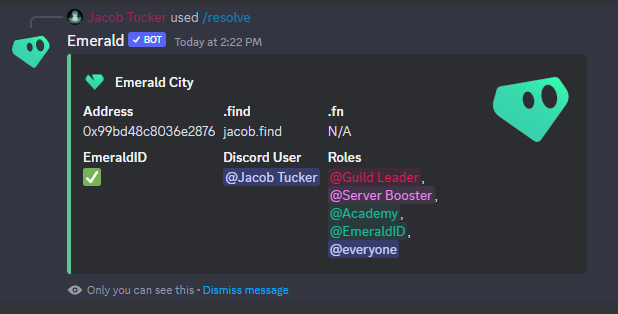
Discover information about a wallet address.

{% hint style="info" %}
Before reading below, make sure you have invited the Emerald bot to your Discord server using [this link](https://discord.com/oauth2/authorize?client_id=907407354427998279\&permissions=294473821264\&scope=bot%20applications.commands).
{% endhint %}

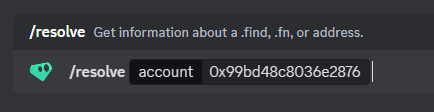
### Command

```
/resolve
```

#### Inputs

1. `account`- a wallet address

### Helpful Pictures

<figure><img src="/files/yKeQviSAC36qCdpLnPQ3" alt=""><figcaption><p>Example Usage #1</p></figcaption></figure>

<figure><img src="/files/8VhypjdCb6TzUArJaVhQ" alt=""><figcaption><p>Example Usage #2</p></figcaption></figure>

<figure><img src="/files/mKvi0qMsuOtxhaBkXmll" alt=""><figcaption><p>Example Result</p></figcaption></figure>


# Users with Role

Get a CSV file of all the users (both discord names and wallet addresses) that have a certain discord role.

{% hint style="info" %}
Before reading below, make sure you have invited the Emerald bot to your Discord server using [this link](https://discord.com/oauth2/authorize?client_id=907407354427998279\&permissions=294473821264\&scope=bot%20applications.commands).
{% endhint %}

### Command

```
/userswithrole
```

#### Inputs

1. `role`- the role the citizens have
2. `wallet` (*optional*) - only return a specific type of wallet address (will be N/A if they don't have it)

### Helpful Pictures

<figure><img src="/files/4UyANFXAi16LIiD71mTO" alt=""><figcaption><p>Example Usage</p></figcaption></figure>

<figure><img src="/files/HReNp7gcSlYSNh3o48JO" alt=""><figcaption><p>Example Result</p></figcaption></figure>


# Users in a Channel

Get a CSV file of all the users (both discord names and wallet addresses) that are in a certain text or voice channel.

{% hint style="info" %}
Before reading below, make sure you have invited the Emerald bot to your Discord server using [this link](https://discord.com/oauth2/authorize?client_id=907407354427998279\&permissions=294473821264\&scope=bot%20applications.commands).
{% endhint %}

{% hint style="info" %}
**Recommended Use Case**: This command works very well with [FLOAT](https://floats.city). If you are hosting an AMA, town hall, or some event in Discord and want to get a list of all the members who showed up, simply use this command and get a list of their addresses. You can then upload that list to your FLOAT event and distribute FLOATs to everyone who came.
{% endhint %}

### Command

```
/indiscord
```

#### Inputs

1. `channel`- the channel the citizens are in
2. `wallet` (*optional*) - only return a specific type of wallet address (will be N/A if they don't have it)

### Helpful Pictures

<figure><img src="/files/IbXK8W1madmEcUku7RjP" alt=""><figcaption><p>Example Usage</p></figcaption></figure>

<figure><img src="/files/oOnyQYvRH6FRnLc1kRGV" alt=""><figcaption><p>What the result looks like</p></figcaption></figure>


# Dapper Sports

A list of commands to use with Dapper Sports products.

### Summary

You can verify certain Dapper Sports NFTs, verify a user owns all NFTs in a "set", view all the moments in a "set", and more.

### Supported Products

{% content-ref url="/pages/5A6Ck189KOeenHg46V1v" %}
[NBA/WNBA TopShot](/products/emerald-bot/dapper-sports/nba-wnba-topshot)
{% endcontent-ref %}

{% content-ref url="/pages/yf1JgsFlokql5MHUpRT7" %}
[NFL All Day](/products/emerald-bot/dapper-sports/nfl-all-day)
{% endcontent-ref %}


# NBA/WNBA TopShot

A list of commands for NBATopShot and WNBATopShot.

{% hint style="info" %}
Before reading below, make sure you have invited the Emerald bot to your Discord server using [this link](https://discord.com/oauth2/authorize?client_id=907407354427998279\&permissions=294473821264\&scope=bot%20applications.commands).
{% endhint %}

## :crossed\_swords:Create a Challenge in Discord

This discord command will let you create your own challenges for your community. You can access a detailed list (discord name + wallet addresses) of those who complete it. And you can automatically run raffles based on who completed the challenge.

### Command

```
/nbatopshot challenge
```

#### Inputs

1. `title`- the title of your challenge
2. `description`- the description of your challenge
3. `play_ids`- a comma-separated list of Play IDs that users must own in order to pass the challenge (ex. `1376,1247,1678,1679,1477`). *A Play ID can be found in the URL on the LiveToken website. For example, the playID here is 1420:* [*https://livetoken.co/listings/topshot?playID=1420*](https://livetoken.co/listings/topshot?playID=1420)
4. `end_date`- a unix timestamp (represented in seconds) for when your challenge should end (ex. `1694199412`). You can use <https://www.unixtimestamp.com/> to get the unix timestamp.

### Accessing User Completion Data

Once you create the challenge, you can click the "Check Status" button. From here, you can click "View Completers" to get a list of users (their discord names + wallet addresses) who completed the challenge.

The bot automatically re-verifies everyone before placing them on the returned file.

### Running a Raffle

Once you create the challenge, you can click the "Check Status" button. From here, you can click "Raffle Winner" to automatically select 1 user who completed the challenge as the winner. You can run this raffle any amount of times.

The bot automatically re-verifies everyone before selecting a winner.

### Helpful Pictures

<figure><img src="/files/7IIlC9lTxxrBolOTWy9r" alt=""><figcaption></figcaption></figure>

## :eyeglasses:View Moments in Set

This discord command will let you view all of the moments that a user has from a specific NBATopShot set.

### Command

```
/nbatopshot momentsinset
```

#### Inputs

1. `address`- the wallet address of the user
2. `setname`- the name of the set (ex. "Cool Cats")
3. `series` - the series the set is from (ex. 2)

### Helpful Pictures

<figure><img src="/files/8BIey5qUz2xF1LEbYcpk" alt=""><figcaption></figcaption></figure>


# NFL All Day

A list of commands for NFL All Day.

{% hint style="info" %}
Before reading below, make sure you have invited the Emerald bot to your Discord server using [this link](https://discord.com/oauth2/authorize?client_id=907407354427998279\&permissions=294473821264\&scope=bot%20applications.commands).
{% endhint %}

## :crossed\_swords:Create a Challenge in Discord

This discord command will let you create your own challenges for your community. You can access a detailed list (discord name + wallet addresses) of those who complete it. And you can automatically run raffles based on who completed the challenge.

### Command

```
/nflallday challenge
```

#### Inputs

1. `title`- the title of your challenge
2. `description`- the description of your challenge
3. `edition_ids`- a comma-separated list of Edition IDs that users must own in order to pass the challenge (ex. `1376,1247,1678,1679,1477`). *An Edition ID is found in the URL of a specific moment. For example, the Edition ID of* [*https://nflallday.com/listing/moment/1390*](https://nflallday.com/listing/moment/1390) *is 1390.*
4. `end_date`- a unix timestamp (represented in seconds) for when your challenge should end (ex. `1694199412`). You can use <https://www.unixtimestamp.com/> to get the unix timestamp.

### Accessing User Completion Data

Once you create the challenge, you can click the "Check Status" button. From here, you can click "View Completers" to get a list of users (their discord names + wallet addresses) who completed the challenge.

The bot automatically re-verifies everyone before placing them on the returned file.

### Running a Raffle

Once you create the challenge, you can click the "Check Status" button. From here, you can click "Raffle Winner" to automatically select 1 user who completed the challenge as the winner. You can run this raffle any amount of times.

The bot automatically re-verifies everyone before selecting a winner.

### Helpful Pictures

<figure><img src="/files/sSPVlhikELVP7qaqsqW2" alt=""><figcaption><p>An example of what you would type into Discord</p></figcaption></figure>

## :eyeglasses:View Moments in Set

This discord command will let you view all of the moments that a citizen has from a specific NFL All Day set.

### Command

```
/nflallday momentsinset
```

#### Inputs

1. `address`- the wallet address of the citizen
2. `setname`- the name of the set (ex. "Against the Clock")
3. `seriesname` - the series the set is from (ex. "Historical 2")

### Helpful Pictures

<figure><img src="/files/FJ69dqtIAXh4OxE6eMmc" alt=""><figcaption></figcaption></figure>


# UFC Strike

A list of commands for UFC Strike.

{% hint style="info" %}
Before reading below, make sure you have invited the Emerald bot to your Discord server using [this link](https://discord.com/oauth2/authorize?client_id=907407354427998279\&permissions=294473821264\&scope=bot%20applications.commands).
{% endhint %}

## :crossed\_swords:Create a Challenge in Discord

This discord command will let you create your own challenges for your community. You can access a detailed list (discord name + wallet addresses) of those who complete it. And you can automatically run raffles based on who completed the challenge.

### Command

```
/ufcstrike challenge
```

#### Inputs

1. `title`- the title of your challenge
2. `description`- the description of your challenge
3. `set_ids`- a comma-separated list of Set (Edition) IDs that users must own in order to pass the challenge (ex. `300,119,67,299`). *A Set ID is found in the URL of a specific edition. For example, the Set ID of* [*https://ufcstrike.com/v2/edition/300*](https://ufcstrike.com/v2/edition/300) *is 300.*
4. `end_date`- a unix timestamp (represented in seconds) for when your challenge should end (ex. `1694199412`). You can use <https://www.unixtimestamp.com/> to get the unix timestamp.

### Accessing User Completion Data

Once you create the challenge, you can click the "Check Status" button. From here, you can click "View Completers" to get a list of users (their discord names + wallet addresses) who completed the challenge.

The bot automatically re-verifies everyone before placing them on the returned file.

### Running a Raffle

Once you create the challenge, you can click the "Check Status" button. From here, you can click "Raffle Winner" to automatically select 1 user who completed the challenge as the winner. You can run this raffle any amount of times.

The bot automatically re-verifies everyone before selecting a winner.

### Helpful Pictures

<figure><img src="/files/nnlJHy1mSk1To2FJjfFD" alt=""><figcaption><p>An example of how you'd create the challenge in Discord</p></figcaption></figure>


# Tipping

Tip users directly in Discord with multiple currencies. Any token created on Toucans is supported.

{% hint style="info" %}
Click [here](https://discord.com/oauth2/authorize?client_id=907407354427998279\&permissions=294473821264\&scope=bot%20applications.commands) to add the Emerald bot to your Discord, which is required for tipping.
{% endhint %}

## Creating an Emerald bot (Discord) Wallet

In order to tip users in Discord, you need to first create a wallet and tie it to your Discord account. This is easily done by typing the below command into a Discord server with Emerald bot in it.

### Command

```
/tip create
```

#### Inputs

* `currency` - the currency you want to allow inside of your account

## Funding Your Wallet

To fund your Emerald bot (Discord) wallet, just transfer your intended currency ($FLOW, $DUST, $VROOM, etc) to your Emerald bot (Discord) **wallet address** like you would any other address.

To find this **wallet address**, just use the `/identify` command with your Discord username as the input, and it will show you your Emerald bot (Discord) wallet address.

## Sending a Tip

{% hint style="info" %}
In order to send a tip, you obviously need to to fund your Emerald bot (Discord) wallet. Follow the above section to do this.
{% endhint %}

Once you have funded your Emerald bot (Discord) wallet, you're ready to go.

### Command

```
/tip send
```

#### Inputs

1. `user`- the Discord user you'd like to tip
2. `amount` - the amount of currency ($FLOW, $DUST, $VROOM, etc) to tip
3. `wallet` - you can choose which of the recipient's wallets you'd like to send the tokens to. They might have multiple connected wallets, so you can choose which one to send to.

## Checking Your Balance

See how much currency ($FLOW, $DUST, $VROOM, etc) you have in your Emerald bot (Discord) wallet.

### Command

```
/tip balance
```

## Withdrawing

To withdraw your funds from your Emerald bot (Discord) wallet, use the below command.

### Command

```
/tip withdraw
```

#### Inputs

1. `amount` - the amount of currency ($FLOW, $DUST, $VROOM, etc) to tip
2. `wallet` - you can choose which of your wallets you'd like to withdraw the tokens to. You must first connect your external wallets to [Emerald ID](https://id.ecdao.org).


# Touchstone

Create an entire NFT Collection for your city all at once.

{% embed url="<https://touchstone.city>" %}

### About Touchstone

Touchstone allows you to create an entire NFT Collection all at once.&#x20;

You gather all your images, names, descriptions, and **any other traits you want** for your NFTs.

### Grow Your City

There is a huge list of utilities Emerald bot provides.

#### Launch Your Art

Of course, if your city is centered around your beautiful NFT Collection, this is the perfect way to create it!

#### Raise Funds

One thing a city on Flow always loves is an NFT Collection to raise funds for the founder (you) and share some awesome mints.

#### Reward Citizens

You can view a list of all the citizens (and their wallet addresses) who buy your NFTs. Simply head to the [Admin Dashboard](https://www.touchstone.city/my-collections) and click the "Download Buyers" button.

#### Gated Access

Set up a specific chat room in your city for users who mint your NFTs. You can verify who owns your NFTs and give them specific roles using Emerald bot below.

{% content-ref url="/pages/BkKGwnm3a0IFoZ3dvfn7" %}
[Verify Touchstone NFTs](/products/emerald-bot/verification/verify-touchstone-nfts)
{% endcontent-ref %}

### Generation Guide

{% embed url="<https://www.touchstone.city/guide/en/contract-generator>" %}

### Example Collection

{% embed url="<https://www.touchstone.city/discover/0xcf0c62932f6ff1eb/TouchstoneFLOWFREAKS>" %}
An awesome collection called [FLOW FREAKS](https://twitter.com/FlowFreaks_wtf) created by [Cutter](https://twitter.com/cutter02).
{% endembed %}


# Emerald Academy

The best and most in-depth way to learn Flow & Cadence development.

{% embed url="<https://academy.ecdao.org>" %}

## Catalog

Check out an entire catalog filled with educational content in the form of courses, bootcamps, roadmaps, blogs, and more.

Learn DApp development, Cadence, Javascript, Web development, and more.

From beginner -> intermediate -> advanced.

{% embed url="<https://academy.ecdao.org/en/catalog>" %}

## Cadence by Example

Taking after the popular [Solidity by Example](https://solidity-by-example.org/) series, we made one for Cadence, the smart contract language used by the Flow blockchain.

Learn Cadence step-by-step through easy to understand examples.

{% embed url="<https://academy.ecdao.org/en/cadence-by-example>" %}

## Quickstarts

Taking after [Scaffold ETH](https://docs.scaffoldeth.io/scaffold-eth/), a popular educational platform to learn DApp developmemt on Ethereum, we made one for the Flow blockchain.

Learn how to build DApps on Flow by cloning pre-made projects and following along written tutorials.

{% embed url="<https://academy.ecdao.org/en/quickstarts>" %}

## Open Source

The entire platform is open source.&#x20;

You can even add your own courses & blogs by following the instructions in the README file below.

{% embed url="<https://github.com/emerald-dao/emerald-academy-v2>" %}

## Multi-Language

On top of the courses and material themselves, the entire platform has built-in multi-language support.&#x20;

Click the language option in the top right to toggle between languages.

Looking to add a new language? You can submit a PR to the GitHub Repo found above.


# Shield

The best way to get your Cadence code audited on Flow.

{% embed url="<https://github.com/emerald-dao/shield>" %}

### About Shield

Shield is an open source auditing initiative run by Emerald City, comprised of:

1. Smart Contracts - for projects to ensure code security and safety (*projects must pay for this*)
2. Transactions - to keep the community safe from malicious developers

**Shield is not only an auditing service, but a paid opportunity to give you advice (and often times direct Cadence help) on best practices, efficiency improvements, general suggestions, and more.**

### Smart Contract Auditing

{% content-ref url="/pages/mIHSQ859ewCBnFJaaNQm" %}
[Contract Auditing](/auditing/shield/contract-auditing)
{% endcontent-ref %}

### Transaction Auditing

{% content-ref url="/pages/yoLYusxcyHiQ3c5hEk8y" %}
[Transaction Auditing](/auditing/shield/transaction-auditing)
{% endcontent-ref %}


# Contract Auditing

Audit your smart contracts and/or receive advice from Cadence experts.

### How Does it Work?

Here is a general process.&#x20;

1. You gather all your Cadence files into a GitHub repository with a `README.md` explaining what the intended solution should do.
2. One of our auditors will go through all the code (contracts and associated transactions) and come back with a cost estimate.
3. If both parties agree, once the code has been frozen, the auditor will begin testing & reviewing all code.&#x20;
4. The auditor will create a report outlining various vulnerabilities, suggestions, efficiency improvements, and more. To see an example report, go [here](#example-audit).

Most audits are done by [Jacob Tucker](https://twitter.com/jacobmtucker), which is also me :)&#x20;

The estimated time is usually \~1 week, but for smaller amounts of code, it could be as little as 2-3 days.

### How to Request an Audit

Simply head to our [Discord ](https://discord.com/invite/emerald-city-906264258189332541)and message in the Shield channel. We will take it from there.

### Example Audit

{% embed url="<https://github.com/emerald-dao/shield/blob/master/project-audits/mfl/Emerald_Shield_Smart_Contract_Audit_Report_-_MFL.pdf>" %}

To see all of our audits, go [here](https://github.com/emerald-dao/shield/tree/master/project-audits).

### Example Certificate

<figure><img src="/files/cTDD8hPbfgydmpEWZw25" alt=""><figcaption></figcaption></figure>


# Transaction Auditing

Protecting the Flow community, one transaction at a time.

### How Does it Work?

Emerald City hosts a [FLIX ](https://forum.onflow.org/t/blockchain-first-human-readable-messages-for-your-transactions/3646)instance. In short, FLIX is a place to store audited transactions. Anyone can host their own FLIX instance. When a transaction gets run, wallets can query into FLIX instances they trust and display associated audits.

Fortunately, [Emerald City's FLIX instance](https://github.com/emerald-dao/shield) is a *peer* of Flow, meaning any transactions hosted by Flow are automatically hosted by Emerald City, and vice versa. *Note this doesn't necessarily mean the other has audited them, rather they will simply be discoverable from either's endpoint.*

### Shield's API

#### Get Template by ID

With the API you can query Interaction Template by their ID:

```
GET /v1/templates/${template_id}
  => InteractionTemplate
```

#### Get Template by Cadence Code

You can also query for Interaction Template by their cadence body:

```
POST /v1/templates/search
  body (JSON): {
    cadence_base64: "...",
    network: "..." (mainnet | testnet)
  }
  => InteractionTemplate
```

#### Get Template by Name

Interaction Template can be hosted under a static identifer (name), allowing the underlying Interaction Template to change while the way to query for it remained constant:

```
GET /v1/templates?name=transfer-flow
  => InteractionTemplate
```

#### Get Auditor

You can query for known Auditor information for a given network:

```
GET /v1/auditors?network=(mainnet | testnet)
  => [FlowInteractionTemplateAuditor]

  // Flow Interaction Template Auditor
  // {
  //   f_type: "FlowInteractionTemplateAuditor"
  //   f_version: "1.0.0"
  //   address: string
  //   name: string
  //   website_url?: string
  //   twitter_url?: string
  // }
```

#### Endpoint

Emerald City's FLIX service is available at:

```
https://flix.ecdao.org

eg: GET https://flix.ecdao.org/v1/templates?name=transfer-flow
eg: GET https://flix.ecdao.org/v1/templates/${template_id}
eg: POST https://flix.ecdao.org/v1/templates/search
    body (JSON): {
      cadence_base64: "...",
      network: "..." (mainnet | testnet)
    }
```

### Example End Result

![](/files/uiWc934eUoSQyktu1UB0)


# Helpful Tools

A list of tools we have built to help citizens and developers alike.

### Explore Flow Accounts

View user NFTs, tokens, storage paths, NFT json data, and more.

{% embed url="<https://www.flowview.app/>" %}

### Setup Collections

Link allows you to set up all your NFT Collections and Fungible Tokens directly in the web browser.

:bangbang:Additionally, **we provide Link as a way to make sure none of your NFT Collections or Tokens are dangerously exposed to hackers**. [A recent hack on Matrix Market](https://twitter.com/0xMatrixMarket/status/1595340742297354243) was widely solved by users connecting to Link and patching their collections.&#x20;

{% embed url="<https://link.ecdao.org>" %}

### Token Airdrops & NFT Raffles

Batch airdrop fungible tokens and raffle away NFTs.

You can also set up **requirements** that citizens must meet in order to be eligible for an airdrop or raffle, including:

* Owning a certain [FLOAT](/products/float)
* Being on a whitelist

{% embed url="<https://www.drizzle33.app/>" %}

### Batch Send Fungible Tokens

{% embed url="<https://www.bayou33.app/>" %}

### Better Playground

A playground to run scripts & transactions on Flow Testnet and Mainnet.

{% embed url="<https://run.ecdao.org>" %}